Multi-User VoIP Feature
Instead of making your team share a single login, give each member secure, organized access to business phone numbers. EasyRinger's multi-user VoIP lets account owners invite team members, assign each person their own set of numbers, and maintain full control from a single central dashboard.
 Money
MoneyBack Guarantee
 Secure
Payment
 Excellent
User Experience


Why Choose EasyRinger for Multi-User VoIP
EasyRinger makes it simple to assign numbers to users, manage access from one place, and keep team communication organized, no hardware required.
Secure User Access Without Shared Logins
Every team member gets their own login, so you always know who handled a call, sent a message, or changed a setting. Individual access means cleaner accountability, better privacy, and easier management when people join or leave the team. There's no shared password to update, no scrambling to revoke access, just remove the user, and you're done. Individual logins keep your multi-user VoIP setup secure and your audit trail clear.


Assign Private Numbers to Team Members
Account owners decide who gets which numbers. Assign one number or several to each user based on:
Role or department
Office location or region
Property or listing (for real estate teams)
Client group or account
Users only see and manage the numbers assigned to them, which keeps everyone focused on the right conversations and prevents calls or messages from landing with the wrong person. As your team changes, you can reassign numbers in just a few clicks.
Calls, SMS, and Voicemail by Assigned Number
Assigned users can manage everything tied to their numbers, including:
Incoming and outgoing calls
SMS settings and message handling
Voicemail greetings and recordings
Call handling rules
Call forwarding destinations
Each number has a clear owner, so there's no confusion about who's responding to a customer or where a message went. Clearer ownership means faster responses, fewer dropped threads, and cleaner records across the team.
Simple Setup for Small Business and Real Estate Teams
EasyRinger's Organization Users feature is built for teams that need a small business virtual phone system that multiple people can manage without sharing one account:
Small businesses can give each team member their own line, with the owner controlling access from one dashboard
Real estate agencies can use it as a real estate phone system with numbers assigned per agent, per property, or per region
Distributed teams can stay connected across locations without a central office
Add users, update assignments, and adjust access as your team grows, all from the same place you manage your numbers.
The Challenge of Managing Business Phone Numbers Across Multiple Users
Shared logins, personal phones, and rigid phone systems all create problems for growing teams. Multi-user VoIP replaces them with private logins and central control.
Shared Logins Create Security and Accountability Risks
When everyone uses the same login, there's no way to know who changed a setting, handled a customer message, or accessed records. If that one password gets shared too widely or leaks, your whole team's access is exposed at once. Offboarding gets messy, too, since removing one person means resetting everyone's credentials. Individual user access keeps your records clean, your team accountable, and your business better protected.

Shared Numbers Can Create Confusion
A lot of teams searching for a shared business phone number actually need shared access to a phone system, not a single number everyone uses. When a single number is passed around, calls get dropped, customers get bounced between people, and no one owns the conversation. EasyRinger supports team-wide access while also allowing you to assign private business phone numbers to each user, so every customer has a clear point of contact.
Traditional Multi-Line Phone Systems Are Too Heavy
Multi line phone systems for small businesses often come with hardware, wiring, contracts, and IT setup that small teams don't need. Business phone systems with extensions can feel like overkill when all you really want is flexible phone access for a handful of people. EasyRinger gives you the multi-user structure without the infrastructure: just numbers, users, and access controls in one dashboard.
Teams Need Flexible Number Assignment
Teams change, and your phone system needs to keep up when people join, leave, switch roles, take on new clients, or move between regions. With EasyRinger, account owners can add a new user and assign numbers in minutes, remove access cleanly when someone leaves, and reassign numbers between users as responsibilities shift, all without involving IT or waiting on a provider.
Built for Organization Users
EasyRinger's Organization Users feature is how multi-user VoIP actually works in your account. The account owner invites team members by email, and each person creates their own secure login. From there, the owner assigns specific phone numbers to each user, which can be one number, several numbers, or different numbers per team member, depending on how the team is structured.
Once assigned, users can manage their own calls, SMS, voicemail, and call-handling settings, but only for the numbers they've been assigned. The account owner retains full visibility and control over the entire account, with the ability to add or remove users or reassign numbers at any time. For larger teams, CSV import lets you onboard multiple users at once rather than inviting them individually.
It's a clean, centralized way to manage business phone numbers across multiple users without giving up control or accountability. Owners stay in charge of the account, users stay focused on their work, and the team gets organized phone access from day one.
How to Set Up Your Team
Give each person their own login and their own number, and keep control of both from one dashboard.
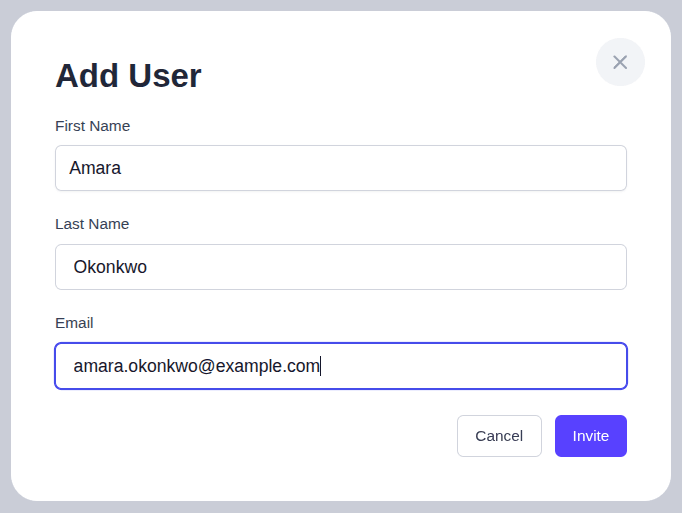
Invite a Team Member
Add each person by name and email from your Organization page. They get an invitation and set up their own login, so nobody shares a password.
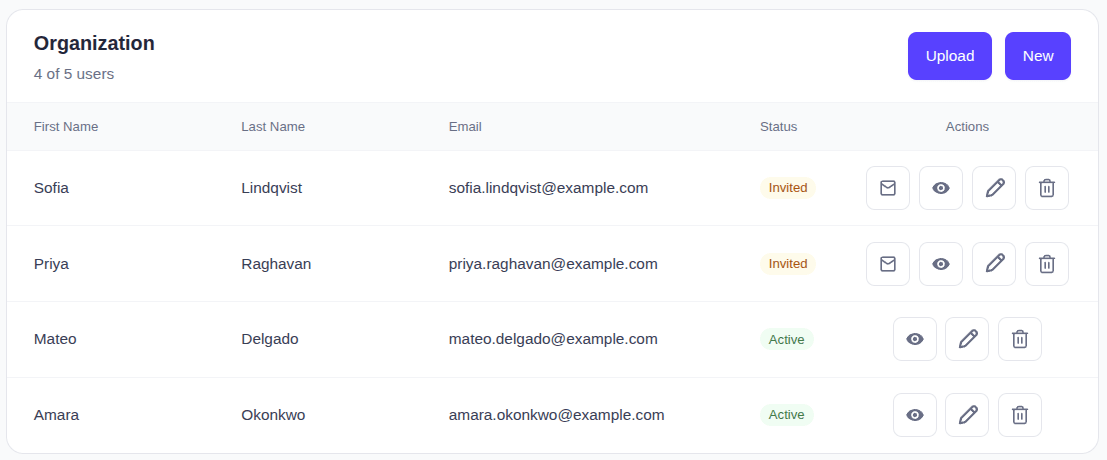
See Who Has Joined
Your organization list shows who has accepted and who is still pending, with a running count against your plan's limit. Resend an invitation from the same row.
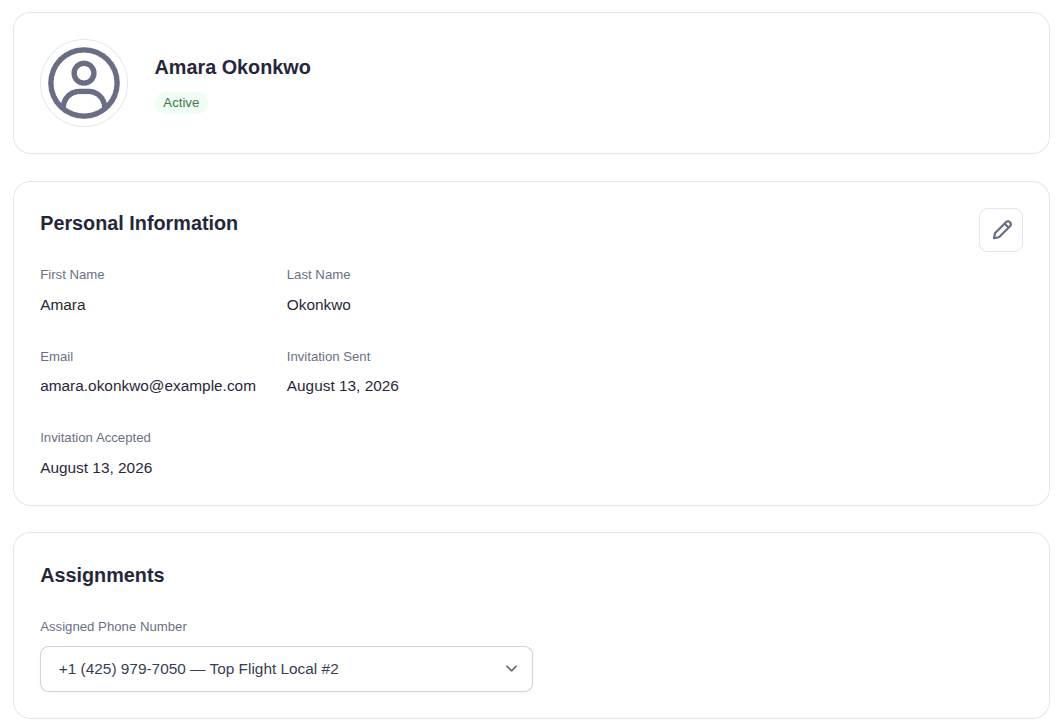
Give Them a Number to Manage
Open a team member and assign one of your numbers. They can then handle its calls, SMS, and voicemail, and nothing else.
Key Features Built for Multi-User VoIP Management
EasyRinger gives teams practical tools for organized, secure phone access without the weight of a traditional phone system.

Invite Team Members by Email
Send a secure email invitation, and each team member creates their own login. No shared passwords, no manual setup on your end.

Assign One or More Numbers to Each User
Owners assign private numbers to each user based on role, team, location, or client ownership. Adjust assignments as needs change.

Isolated Access for Calls, SMS, and Settings
Personal workflows stay focused, so users see only their assigned numbers and the related calls, SMS, voicemail, settings, and activity.

Bulk Import Users With CSV
Onboard multiple team members at once with CSV import. Useful for larger teams, new offices, or migrating from another system.

Account Owner Controls and Reassignment
Add users, remove users, and reassign numbers as team responsibilities change, all from one dashboard, with no provider tickets required.
What EasyRinger Subscribers Say
Multi-User VoIP for Business FAQs
Find quick answers to common questions about multi-user VoIP and EasyRinger's Organization Users feature.
Multi-user VoIP is a VoIP phone system for small businesses and growing teams that lets multiple members access business phone numbers from their own secure logins. Instead of sharing one account or passing a single number around, each user gets their own access and can be assigned specific numbers to manage: calls, SMS, voicemail, and all.
Yes, EasyRinger account owners can assign one or more virtual phone numbers for business use to each user based on role, location, client, or however the team is structured. Users only see and manage the numbers they've been assigned, which keeps customer conversations organized and accountability clear across the team.
Searching for a shared business phone number, a shared phone number app, or a shared SMS inbox usually means looking for a way to give multiple people access to the same line, which often leads to dropped threads and unclear ownership. EasyRinger gives each user their own login and assigns a private number, so the team shares access to the system, not the same number. You get team-wide visibility with individual accountability and better data security.
Organization Users is available on EasyRinger's Pro and Pro Business plans. If you are currently using a different plan, you can upgrade from your account dashboard to add multi-user access, assign phone numbers to team members, and manage users from one central account.
Get Started with EasyRinger Today
Set up secure team access, assign private business phone numbers to individual users, and manage your multi-user VoIP from a single dashboard. No hardware, no contracts, no shared logins, just fast, organized phone access for your whole team.
Invite Your Team